November brought several rounds of important updates to Squirrly SEO, with improvements to the way you manage your SEO settings, work with keywords, inspect pages and connect AI assistants.
There are also a few changes worth highlighting if you manage larger WordPress websites. You can now export and import your SEO setup in one file, including page optimizations, keywords, redirects and schemas. And if you use WooCommerce, product schema now works with WooCommerce Brands.
We also made changes to the setup experience, sitemap handling, Focus Pages and the Live Assistant, alongside a number of fixes across the plugin.
Let’s take a look at what changed throughout November, starting with the free Squirrly SEO plugin updates, followed by the Advanced Pack and Squirrly Cloud App updates.
To get every change in this post, update Squirrly SEO to version 14.2.13 and the Advanced Pack to version 2.5.12.
November Updates to the Free Squirrly SEO Plugin
1. Export and Import Everything in One File
One of the biggest additions in November is Export Everything and Import Everything.
You can now export your Squirrly SEO setup into a single file. This includes:
-
Settings
-
The SEO of every page, including its keyword optimizations
-
Briefcase keywords and their labels
-
Advanced Pack redirects and schemas
When importing a large website, the process runs in steps and includes a progress bar.
Import Everything also restores files created with the older Backup buttons, while keeping your site connected to Squirrly Cloud.
This gives you one place to manage an export or import of your Squirrly SEO data instead of handling different parts of your setup separately.
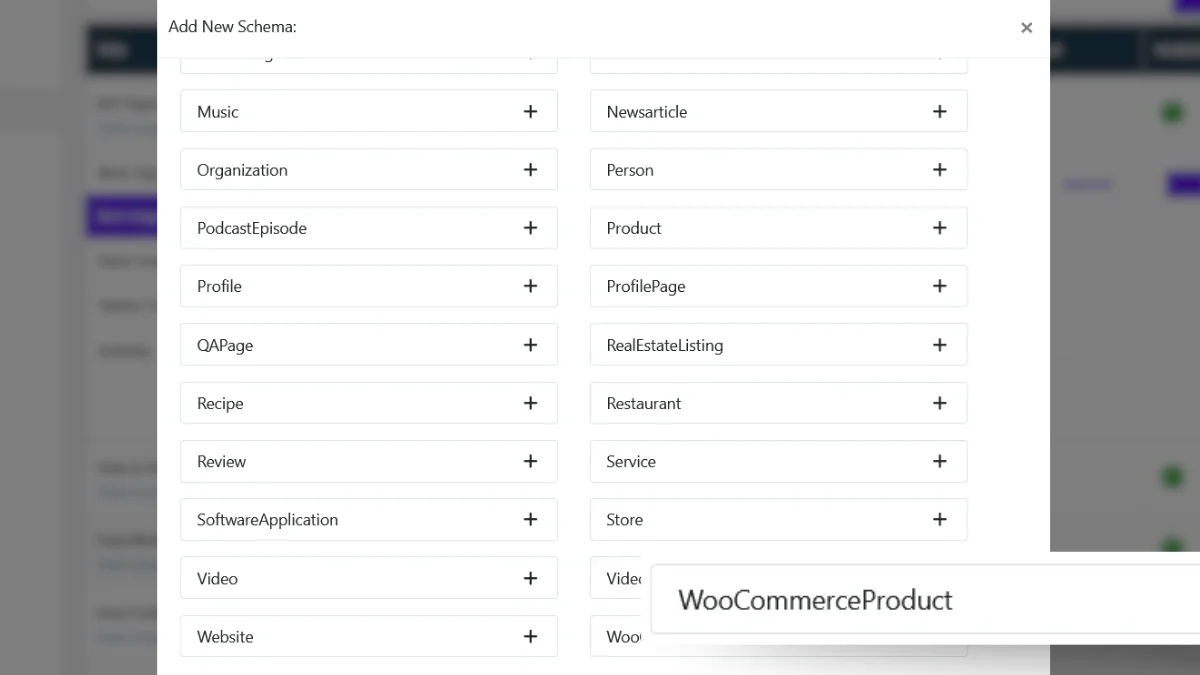
2. Product Schema Now Supports WooCommerce Brands
If you run a WooCommerce store, there’s another useful addition.
Product schema and the {{product_brand}} pattern now use WooCommerce Brands.
We also fixed an issue with product reviews in structured data:
– Products without reviews no longer get a default rating or review in the schema, as Google’s review rules require.
This means products without customer reviews will no longer have ratings or review information added by default.
3. Improvements to Focus Pages
Focus Pages received several updates throughout November.
They now send the page’s SEO settings to Squirrly Cloud, so your Squirrly account can show Focus Pages too. This means you can now open and check your Focus Pages directly from the Squirrly Cloud app.
The updates also address several issues with how Focus Pages handle SEO checks and page information:
-
Focus Pages send the page’s SEO settings to Squirrly Cloud with every new audit.
- The Present in sitemap check now correctly fails when a page is excluded from the sitemap.
-
Focus Pages: the canonical task checks that the canonical points to the page itself, and duplicate titles are listed again.
We also made Focus Pages easier to navigate. You can see the whole list at once, and tasks open in a side panel when you click a dot.
4. A More Guided Setup Experience
We made several changes to help explain what each part of Squirrly SEO does while you’re setting it up.
In version 14.2.12, these improvements included:
-
Setup step 1 explains what each mode does.
-
Before you connect, each screen says which feature it opens.
-
The Live Assistant shows how to add your first keyword and waits for a keyword before the next steps.
-
Sync Keywords shows a Connect Google Search Console button on sites that aren’t connected yet.
-
Optimize Posts has an Optimize Existing button that opens your posts, pages and other post types.
We also improved the Live Assistant’s keyword experience:
-
Live Assistant Step 1 shows each keyword once, and the Integrated Box has even spacing. The Live Assistant finishes loading when you start a new post from a keyword with the Integrated Box layout.
-
The Live Assistant and Add New Page in Focus Pages say when a page must be published before it can be a Focus Page.
-
Optimize for this opens the Live Assistant with the keyword already added to the post in Step 1. The Live Assistant loads images as soon as you open the Enhance step.
These changes make the steps and requirements clearer as you move through the different workflows.
5. Keyword Research and Briefcase Improvements
Keyword Research received a new shortcut in version 14.2.9.
You can now add selected keywords to the Briefcase in one click, with a label, up to 50 at a time.
We also fixed several issues in the keyword workflow:
-
Keyword Research tables load without errors, and the step 2 checkboxes line up with the keywords.
-
Import keywords from CSV in Keyword Research opens the import tab.
-
Keywords added from Google Rankings > Add Keywords are tracked in Rankings.
-
AI assistants can read the Briefcase a few keywords at a time.
The Briefcase also received a small but useful fix:
– Briefcase saves labels once per click.
6. Sitemap and Indexing Changes
There were several changes to sitemap handling during November.
First, sitemap settings no longer ping Google, which retired its ping service. IndexNow sends your new posts instead.
Later in the month, we updated the sitemap URLs:
– /sitemap_index.xml and /wp-sitemap.xml redirect to /sitemap.xml, and search engines are asked not to list the sitemap files themselves.
We also addressed a number of sitemap-related issues:
-
The pages sitemap lists a static home page only once.
-
The archives sitemap lists every month with posts.
-
Paginated sitemaps list every item once when items share the same date.
-
Attachment pages that redirect to the file are left out of the sitemap.
-
SEO changes made in Bulk SEO or the SEO Snippet show at once in the sitemap and on cached pages.
-
The sitemap refreshes after every change on hosts where Squirrly keeps its cache in the database.
These changes cover both how sitemap URLs are handled and how changes to your website are reflected in the sitemap.
7. A New Knowledge Base and Clearer Help Messages
We also moved the help links to our new knowledge base at howto.squirrly.co.
The new knowledge base includes a tutorial for every feature, making it easier to find instructions when you need help with a particular part of Squirrly SEO.
Other improvements include:
-
Live Assistant shows a clear message for each connection problem, with a reconnect link that works on every page.
-
Permission messages name the role you need, and menu tabs match what each role can open.
-
GEO Audit, Focus Pages, Rankings and Research show the Maintenance and Reconnect screens when needed.
-
New WordPress roles get Squirrly access as soon as a user has them.
We also made some smaller interface changes:
-
On Focus Pages and Bulk SEO, the tasks open in a side panel when you click a dot.
-
The collapsed sidebar opens as a full-height panel on hover and loads without jumping.
-
All Features filters as you type.
-
All Features opens at the top of the page.
8. More Fixes Across Squirrly SEO
Alongside the larger additions, November included fixes for compatibility, SEO settings, automation and the WordPress editor.
Here are some of the other changes included in the November releases:
AI connections and compatibility
-
AI assistants connect on sites that run WooCommerce 11.
-
ChatGPT connects on sites that also run WP Rocket or Imagify.
-
The AI connection works next to WP Rocket and Imagify, and activating them no longer stops with an error.
-
The Live Assistant finishes loading when you start a new post from a keyword with the Integrated Box layout.
-
AI assistants can read the Briefcase a few keywords at a time.
SEO settings and the WordPress editor
-
The SEO Snippet box stays in the editor when the Squirrly admin bar is turned off.
-
Links from tasks to Automation open the screen with all your post types.
-
When Sitemap XML or another feature is turned off, its settings tab no longer shows.
-
One Page Setup asks before No SEO Configuration turns off Squirrly’s SEO, and opening it no longer saves anything.
-
The home page title no longer ends with a stray separator when the site has no tagline.
-
Connect Tools shows which code is wrong instead of “Can’t save the settings.”
-
The Connect the Webmasters task is done once Google Search Console is connected.
-
The import warning links to Export Everything.
Other fixes
-
Ask Google to Re-Index opens your Search Console property and copies the page address for Inspect any URL.
-
llms.txt keeps code examples, like
<meta>tags, exactly as you saved them. -
llms.txt and robots.txt show & and non-English URLs exactly as written.
-
Automation keeps the separator you saved.
-
On Multisite, uploading a site icon keeps the network’s favicon.ico.
-
The X (Twitter) profile starts empty instead of X’s own account.
-
Users who can’t manage rankings no longer see Send to Rankings in the Briefcase.
- No PHP 8.2 deprecation notices on Check SEO and IndexNow.
- Deleting the plugin no longer writes warnings to the PHP error log.
We also corrected the GEO Audit score chart so it shows the oldest audit first.
Dev Kit
Dev Kit now has separate switches for AI Visibility and AI Tools, and a new Dev Kit package applies as soon as you upload it. Plus, a Dev Kit logo that isn’t a real image, or is larger than 200 KB, no longer loads into every admin page.
9. Breadcrumbs and Additional SEO Improvements
Another update concerns how page relationships are represented in structured data.
Pages, custom post types and their archives now get breadcrumbs in the JSON-LD:
Home > archive or parent page > page
We also fixed the breadcrumb trail for tag and taxonomy archives so they no longer show an unrelated category.
Other SEO-related fixes include:
- With the Advanced Pack, old category URLs redirect to the new ones when the category base is removed.
-
Importing from SEO Title Tag brings the SEO titles and descriptions over.
-
Importing All in One SEO settings puts the Google verification code in Google Search Console, not Analytics.
-
The link options in the block editor (Open in New Tab, No Follow, Sponsored) no longer overlap.
-
Open Graph and schema dates show the exact publish and update time on sites set to a timezone other than UTC.
Advanced Pack Updates
The Advanced Pack also received an update in November, with changes to structured data, redirects and plugin management.
Advanced Pack 2.5.12 (3 November 2026) introduced the following:
-
New: Pages, custom post types and their archives get a BreadcrumbList in the JSON-LD (Home > archive or parent pages > page).
-
Fix: Tag and taxonomy archives no longer show an unrelated category in the breadcrumb trail.
- Fix: Patterns such as {{customfield(name)}} are replaced inside lists too, like the ingredients of a Recipe schema.
-
Fix: A bulk Delete on the Briefcase, Labels or Rankings screens asks for confirmation once and runs once.
-
Fix: Old category URLs redirect to the new ones when the category base is removed.
-
Fix: The Redirects and JSON-LD tables are created on activation, also when the plugin is activated from WP-CLI, and checked on update.
-
Fix: The redirect log shows an empty list instead of an error when its table is missing.
-
Fix: Uninstall removes the Advanced Pack data again when Complete Uninstall is on.
-
Fix: No PHP 8.4 errors in the update checker.
-
Fix: The Media Library and Images icons show again.
-
Update: Help links open the new Squirrly knowledge base articles.
Squirrly Cloud Updates
There were also a few changes to Squirrly Cloud in November.
The 19 November 2026 update addressed three areas:
-
Fix: The lifetime.squirrly.co dashboard opens for accounts that haven’t redeemed a code yet, instead of showing a critical error.
-
Fix: A code stacked on the 10-code plan is refused and stays unused.
-
Fix: Stacking a lifetime code no longer switches off a paid Paddle or FastSpring plan on the same account.
-
Fix: The Dev Kit accepts only a real image of up to 200 KB as the logo.
These changes address the lifetime dashboard, code stacking and Dev Kit logo handling.
Security Update: Squirrly SEO 14.2.13
We also released Squirrly SEO 14.2.13 on 25 November.
This release contains a security fix:
– Fix: Security: SEO Links now changes only the real rel and target attributes of external links, so a crafted comment can’t add code to the page. Thanks to Wordfence for the report.
We recommend updating to 14.2.13 as soon as possible, especially if you use SEO Links to manage external links on your site.
A Few More Fixes Worth Mentioning
There were some additional corrections across the November releases:
-
Fix: Feature links open All Features already filtered.
-
Fix: Text corrections in settings, tasks and the IndexNow help.
-
Fix: The 650 features link opens the All Features article.
-
Fix: Dev Kit: the top bar shows your plugin name, and Bulk SEO and How To & Support follow their switches.
-
Fix: The GEO Audit score chart shows the oldest audit first.
- Fix: Advanced Pack: The Media Library and Images icons show again.
- Fix: Advanced Pack: No PHP 8.4 errors in the update checker.
Looking Ahead: Making Your Website Ready for Search in 2027
Search is changing, and preparing your website for 2027 means thinking beyond traditional search results.
People are increasingly using ChatGPT, Claude, Perplexity, Gemini and Google AI to discover businesses, compare products and find information. Your website needs to be accessible to these systems, with content they can retrieve, understand and cite.
That’s why we’re continuing to develop Squirrly SEO around both traditional SEO and Generative Engine Optimization (GEO).
You can use Squirrly as your complete Holistic SEO and GEO system, or keep your existing SEO plugin and use Squirrly for its GEO and AI visibility tools.
The platform brings together GEO audits, AI research, internal linking, custom schema, LLM indexing, AI visibility measurement and page-level inspections. It also includes the guided 14 Days Journey to GEO, which helps you work through the practical steps involved in preparing your website.
Our goal is to give WordPress website owners, marketers, SEO professionals and agencies the tools to work on search visibility as it evolves, without having to abandon the SEO workflows they already use.
And we’d like you to help us decide what comes next.
Go to our official Squirrly SEO roadmap to share your feedback, suggest features you’d like us to work on and vote for ideas that are already there.
Your suggestions help us understand what matters most to the people using Squirrly SEO every day. If there’s something you’d like to see improved or added in 2027, this is the place to tell us.
Thank you for being part of the Squirrly community. ❤️